Sign-In / Sign-up Process
Purpose
This guide provides new contractors with a high‑level overview of how the Red Willow Contractor Verification (RWCV) system works, what contractors are responsible for, and how RW staff support and monitor the process.
What RWCV Is (At a Glance)
RWCV is the system used to:
- Onboard new contractors
- Verify documentation
- Track approval status
- Provide a centralized contractor dashboard
Each contractor has:
- Access to the main RWCV Hub: https://southernute.sharepoint.com/sites/rwcvhub
- A dedicated site that is a dashboard view of your information and uploaded documents that is accessible via the RWCV hub
The Process:
Step 1: Submit the Prequalification Form
Once an invitation has been entered by a Red Willow Project Manager, the contractor will receive two emails:
- Invitation email with subject “RWPC Contractor Verification (RWCV) Prequalification” with a link to the Red Willow Contractor Verification Prequalification form and other useful information.
- Second email with subject “RWPC Contractor Verification: More information” with a 6-digit randomly generated authorization code that is required to submit the form will also be sent to the vendor
This Prequalification Form collects:
- Company and contact information
- Intended services and activities
- Insurance and safety‑related details
- Answers submitted in this form are automatically evaluated for risk, which impacts the required minimum insurance limits. Please pay careful attention to ensure that you are entering accurate information. This portion of the form should be completed in collaboration with individuals knowledgeable about technical operations.
Once submitted, the RWCV team reviews the information and begins the setup process which can take up to 2-3 days to complete.
Step 2: Accessing the RWCV portal
- New Contractors should have already have received an email inviting you to access Southern Ute Indian Tribe content. Open the link and authenticate as directed to authorize your access.
- Contractors will also receive a separate email with subject “Your RWPC Contractor Verification program application has been received” with a link to the RWCV portal: https://southernute.sharepoint.com/sites/rwcvhub
- Contractors will need to authenticate to view the Hub.
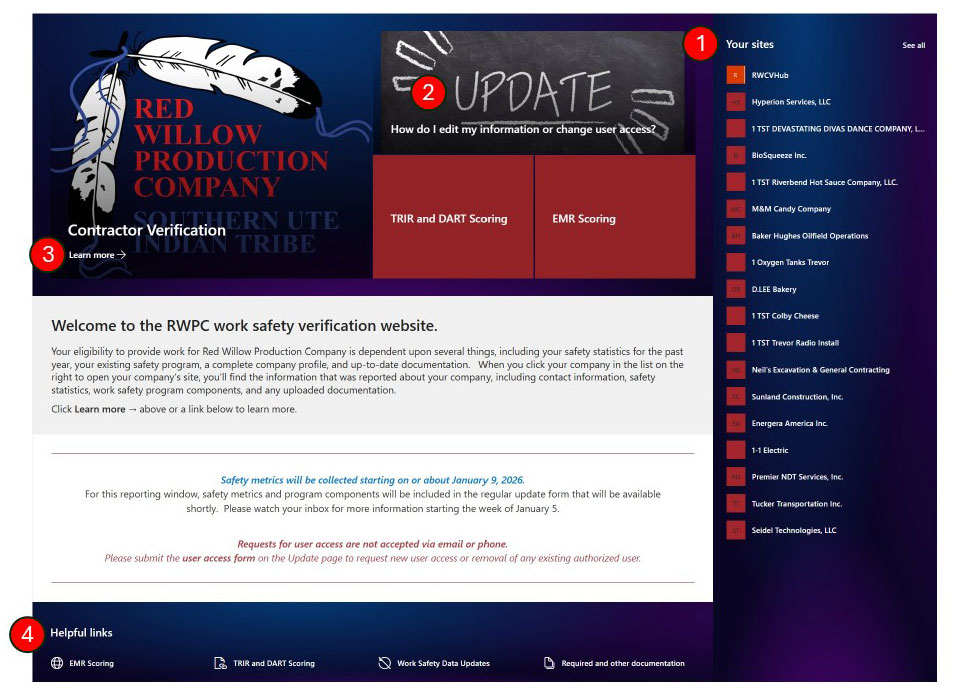
- List of linked sites to which you have access. Click on the site to access your company site dashboard.
- The Page that contains forms for general and safety information updates
- Learn More about the RW Contractor Verification Program
- Helpful Links
Step 3: Accessing your company site (dashboard)
After you click on the link to your site (#1 area in graphic above) it will take you to your company site.
-
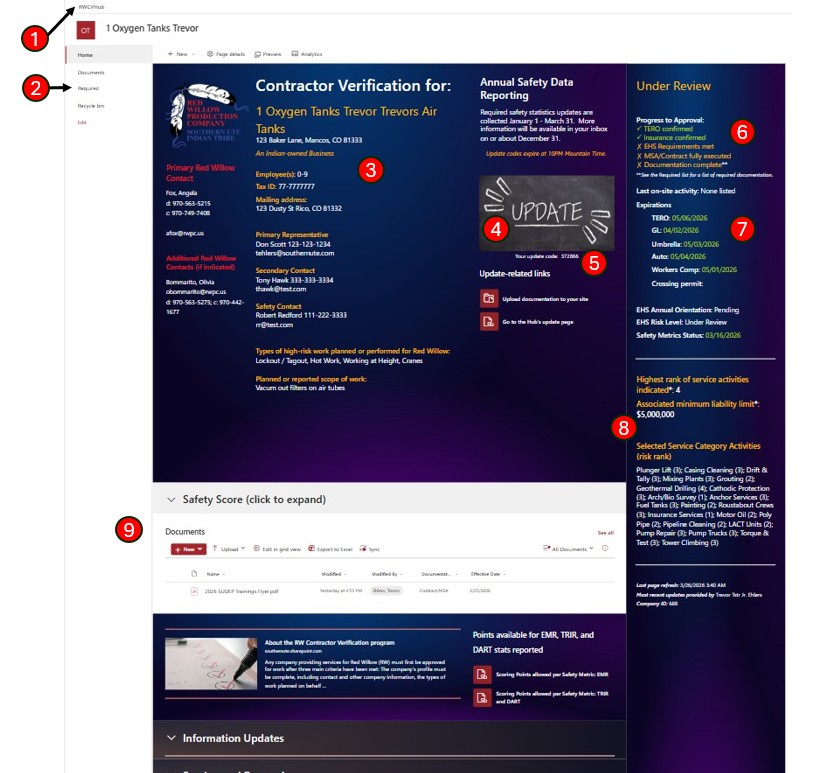
- Link back to RWCV Hub
- List of Required Documentation
- Main Content Area shows information submitted on the prequalification or update form:
- RW Contact/Project manager
- Company details, contact, address
- Links to resources and the Update page
- Intended/Actual services provided and scope of work
- Link to Update your company’s information/Request or change user access
- Update Code (refreshed nightly) – this code is used when updating company information
- Overall Status and Progress to Approval indicators. A yellow status indicates “Pending Review” whereas a green status indicates “Confirmed”. Please note that a status “Pending Review” is the default approval status set for any new request or update that affects any of these expiration dates (Insurance (GL, Auto, Workers Comp, Umbrella) and TERO).
- Expiration Dates for items such as Insurance, TERO and Crossing Permit
- Minimum liability limit amount and Service Category Activities and Risk Ranking
- Documents library – this is where contractors will upload their required documentation.
Step 5: Upload Required Documentation
New contractors are responsible for uploading required documents to their RWCV site, such as:
- Insurance certificates
- Safety documentation
- Other required compliance materials
Uploaded documents must include the appropriate document type and dates.
Step 6: Approval Review
Once required information and documents are submitted:
- Red Willow reviews the materials
- Additional clarification may be requested
- Approval status is updated on your dashboard
Approval is not complete until all required items are received and verified.
Need Help?
If you encounter issues:
Contact the RW Contractor Verification team via one of the 2 forms: